
Prepare your footage and roster
Choose files, organise periods, and avoid common upload problems.

Gather the game information
Have the opponent name, game date, final scores, and the players' names and jersey numbers ready. Check that the selected team in the sidebar is the one that played.
Choose video files
Use MP4, MOV, or MKV when choosing files. The web upload checks that a file is a video and rejects empty files. The footage picker shows a 25 GB limit for an individual file. Compress or split a larger recording before trying again.
If a video is stored in iCloud Photos, let the download finish before selecting it. If the app reports that the file came through empty, select it again once downloaded, or choose the video through Files.
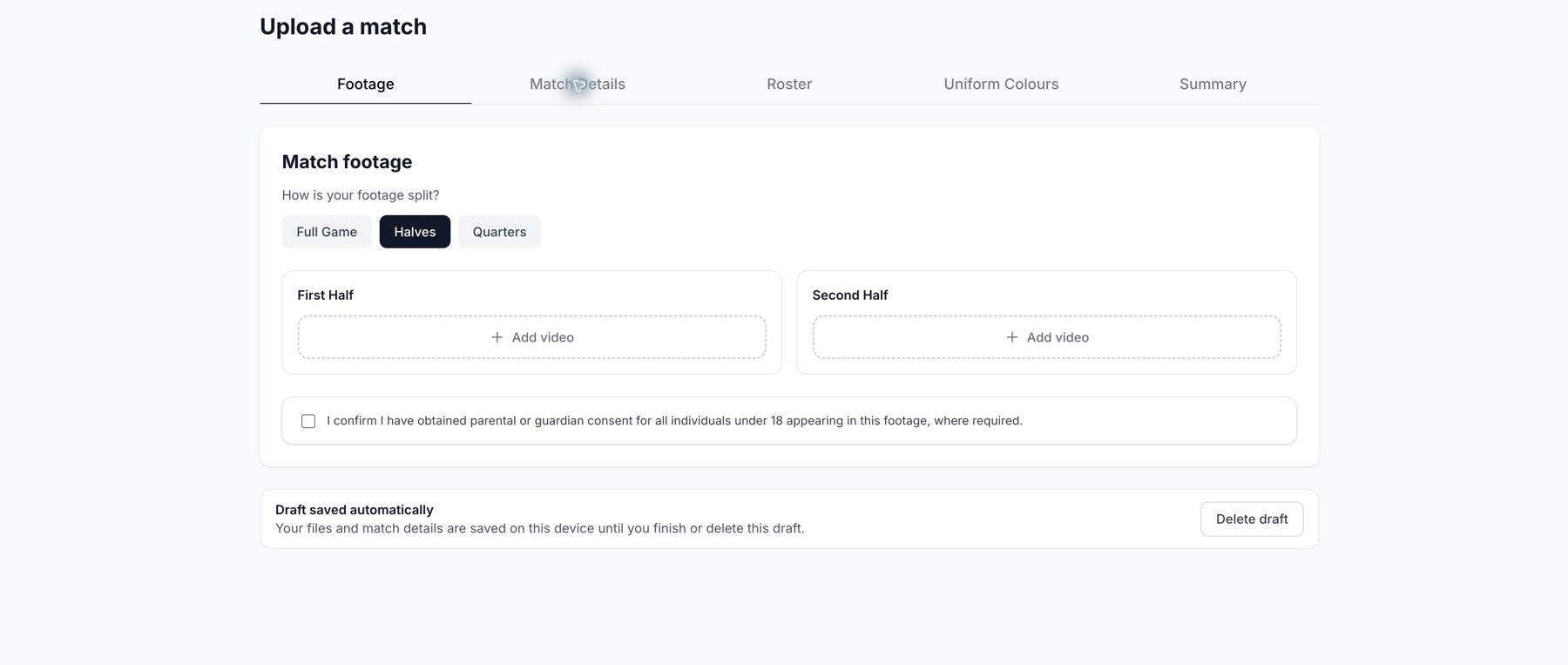
Choose Halves to upload the first and second half separately.
Match the footage layout
| Option | Where your footage goes |
|---|---|
| Full Game | One full-game slot. |
| Halves | First Half and Second Half slots. |
| Quarters | Quarter 1 through Quarter 4 slots. |
For split footage, use the appropriate period and keep multiple clips in playing order. Check duplicate-file warnings so the same recording is not included twice. Choose the layout before attaching your files because changing it resets the footage selection.
Check the roster
A regular upload requires at least four players with a first name, last name, and jersey number. The signup submission can proceed without a named roster. Jersey numbers must be unique within the match roster. Confirm the consent statement shown in the upload flow before submitting.
YouTube URL import is currently unavailable in the web portal. Use a video file you are entitled to upload.
Related guides
Was this helpful?