
Invite players and parents
Share the team code and help someone claim the correct profile.

Share the invitation
- Open
Playersfor the team you want to share. - Find the
Team codeand chooseShare with players. - Review the prepared message.
- Copy it to your team chat, or choose WhatsApp or SMS.
Players and parents can download the Superstat app, enter the team code, and claim their own stats and highlights. Ask them to choose the correct roster profile rather than creating a duplicate player entry.
Team code versus staff invitation
The team code is for the player-profile flow. To give a coach or administrator access to the club portal, the owner should use Settings > Members and choose the appropriate teams and permission level.
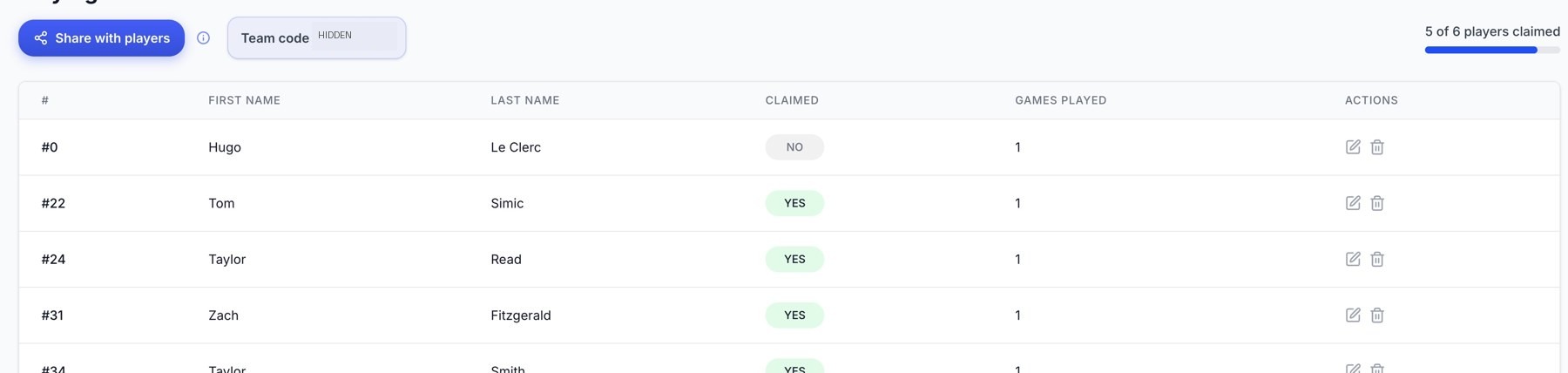
Playing Roster: claim status and player actions. The team code is obscured.
Track claims
The roster page can show claim progress. If the account offers a free-game reward for player claims, use the progress and eligibility shown in the app; the required count and whether a reward has already been granted can vary by account.
If someone cannot join
Check that you shared the current team's code, that the player exists on its roster, and that the person is using the correct sign-in email. If no team code is displayed, refresh the page. Contact support if the problem continues or the wrong player was claimed.
Related guides
Was this helpful?