
Invite staff and manage member permissions
Give coaches and viewers access to the right teams.

Invite a member
The club owner manages membership in Settings > Members.
- Select
Invite Memberand enter the person's email. - Choose access to all teams or specific teams.
- Select the permitted teams if using specific access.
- Choose
View OnlyorCan Edit. - Review the address and permissions, then send the invitation.
Can Edit allows uploads, stat editing, and player management for the permitted teams. View Only is for viewing games, stats, and insights. Billing remains with the club owner.
Review existing access
The members table shows the people in the club and their team permissions. The owner can change a member's editing level or team scope using the controls in the table.
Use Resend invitation if a person has not received or completed the invitation. Ask them to sign in with the invited email address.
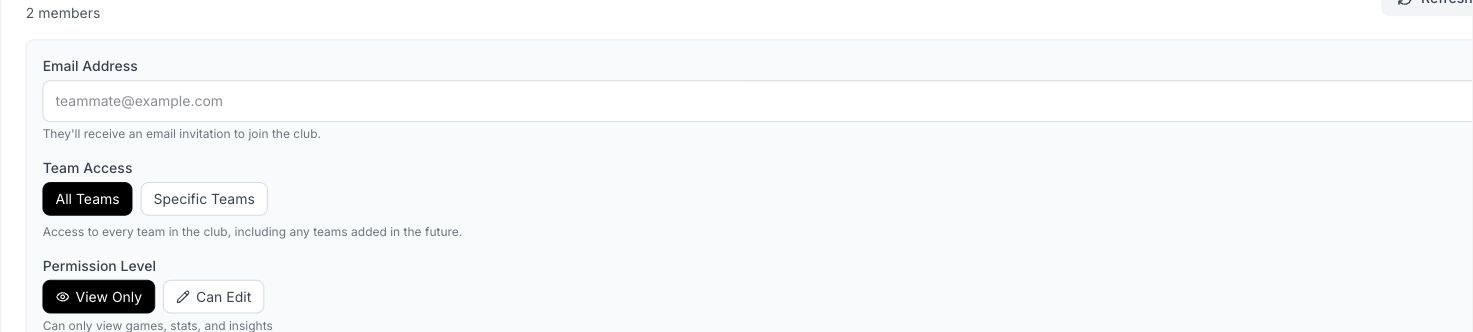
Member invitation options for team scope and permission level.
Remove access
Revoke access to a specific team when someone still needs other teams. Remove the member when they should no longer have club access. Check the target person and scope before applying the change.
Players and parents
Use Players > Share with players for the team-code profile-claim flow. A staff invitation and a player claim provide different access, so choose the flow that matches the person's role.
Related guides
Was this helpful?