
Use player reviews and the fatigue view
Compare individual feedback with how event output changes through a game.
Open an individual review
In Resources, choose the completed game and select Player Review. Expand a player to read their generated review. Compare its points with the player's game stats and footage before turning them into coaching feedback.
Use the regenerate control when the event data has changed. If a player is missing, check their roster assignment and recorded events.
Read the fatigue view
Choose Fatigue for “Late-game output vs peak”. The chart divides the recorded event timeline into four segments and compares each player's efficiency output in the final segment with their peak segment. The table shows the segment trend, final-segment change, and a signal such as “Strong finish” or “Fading”.
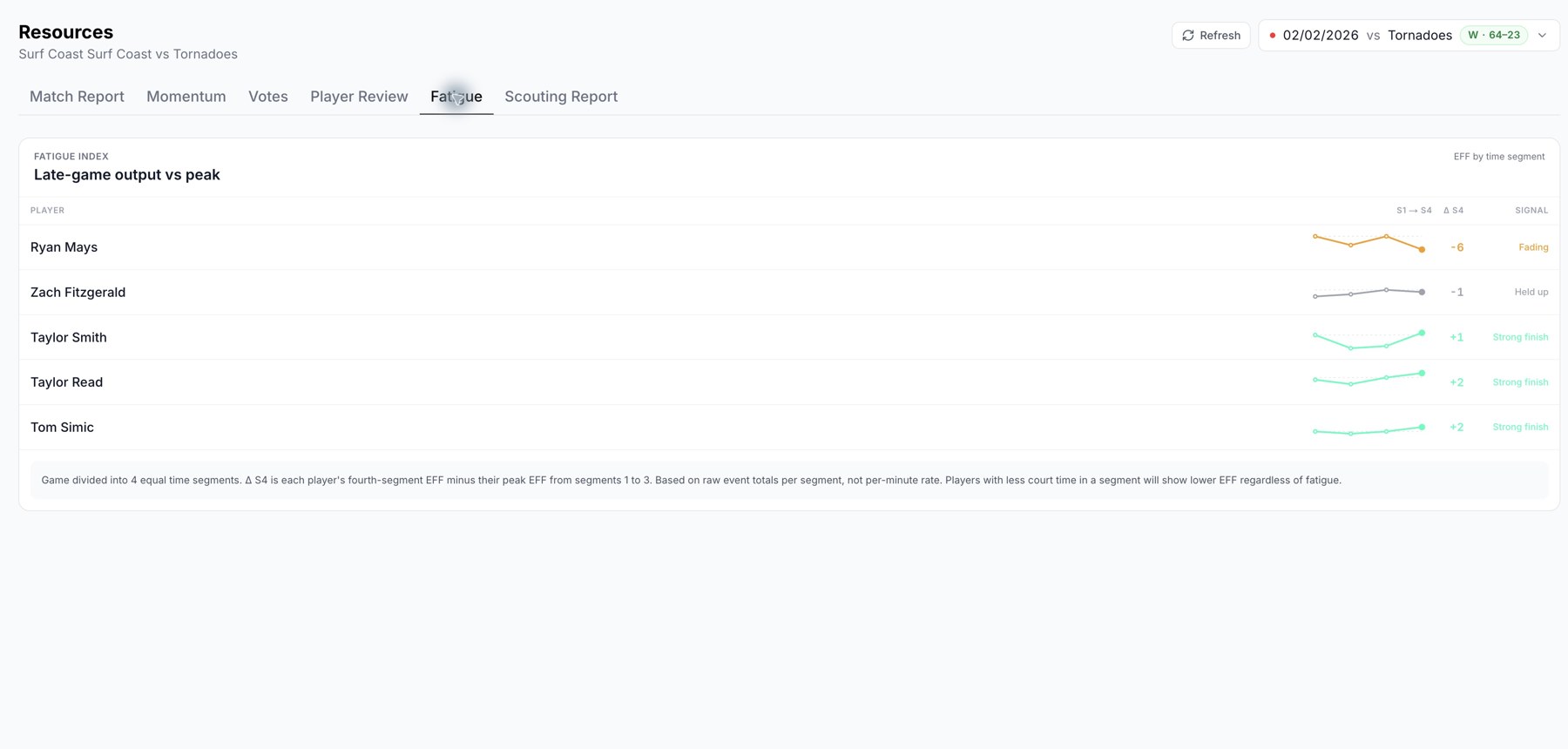
Event-based output across time segments; this is not a medical measurement.
Interpret the signal in context
The signal comes from recorded basketball events. It does not measure physical fatigue directly. Substitutions, playing time, game role, and the available event sample can change a player's output. Use it to choose moments to review in the video, rather than treating the label as a fitness assessment.
If the view is empty
The screen needs enough timed event data to calculate the segments. Check processing status and event assignments first. A sparse or incomplete game may not support a useful comparison.
Related guides
Was this helpful?