
Find and organise your matches
Use folders, sorting, and selection to keep a season organised.

Find a game
Open Matches and check the team shown in the sidebar. Match cards show the opponent, played date, score, and available video information. Select a game to open its viewer.
Use the sort control to choose Created at or Match date. The first reflects when the game was added; the second reflects when it was played. This is useful when older footage is uploaded later.
Organise folders
- Choose
New folderand give it a useful name, such as a season or competition. - Drag a match onto the folder on desktop. On a touch screen, long-press to begin dragging.
- Alternatively, choose
Select, tick matches, and useMoveto choose a folder. - Select a folder to view its games, or
All Matchesto return to the full list.
Folders also help you scope the aggregated results in Performance. Use a consistent folder structure before comparing parts of a season.
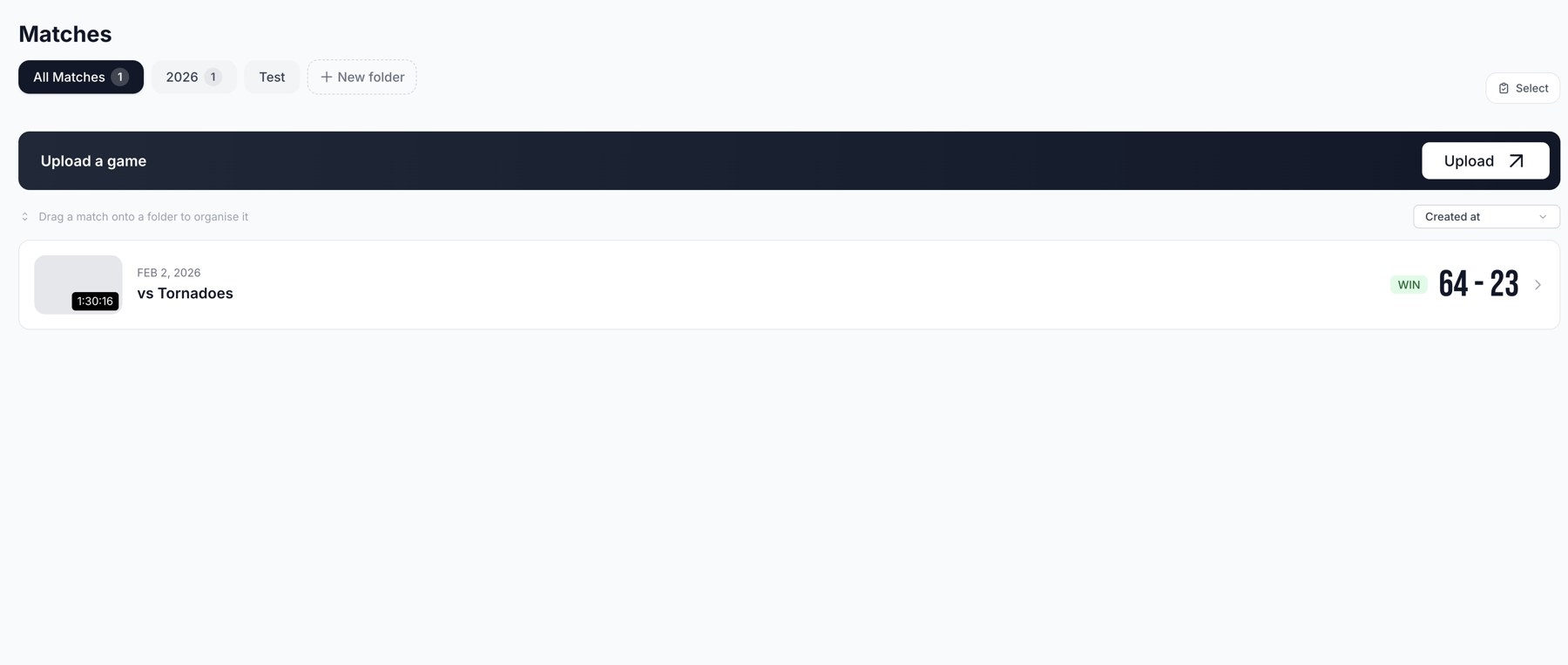
Matches: select the team, organise games, and open completed footage.
Rename or remove a folder
Use the folder's action menu. Removing a folder leaves its matches uncategorised; it does not delete those games.
Missing games
Check the team selector and active folder first. Upload drafts appear separately from completed games. A game that is still processing will not yet have all of its stats, highlights, or coaching analysis.
Related guides
Was this helpful?