
Understand game and opposition credits
Check balances and choose the analysis you need.

Check the selected club
Select the appropriate team and open Credits. The sidebar also shows game credits and opp credits. Confirm the club before purchasing or troubleshooting a balance.
What each balance means
Game credits analyse your team. Opposition game credits analyse both teams in a game. The upload flow chooses the applicable entitlement for the analysis option you select.
If your club has an active subscription, the page and sidebar can also show monthly upload usage. A plan allowance and purchased credits are distinct; read the balance and plan information together.
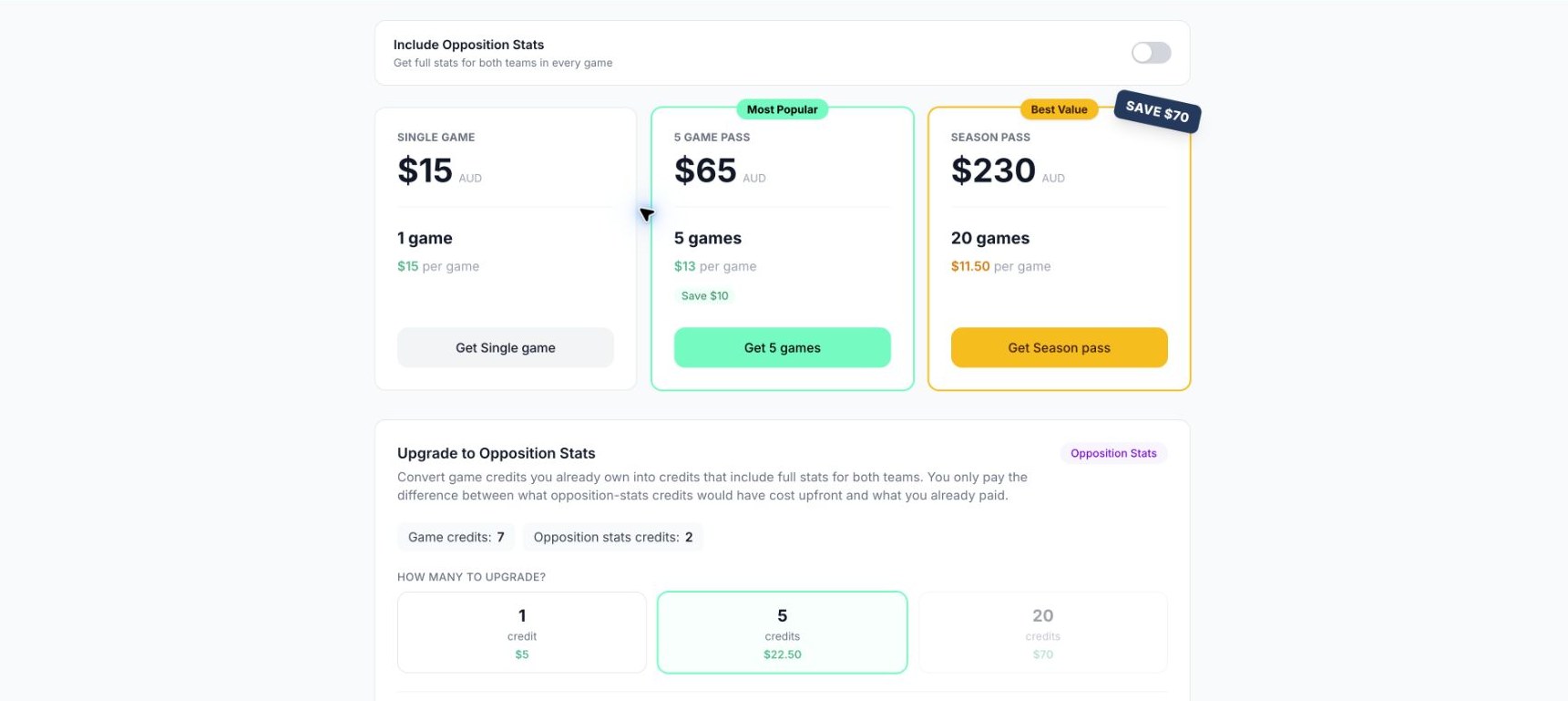
Credit packages and opposition upgrades. Use the live app for current prices.
Purchase or upgrade
The club owner can choose from the purchase and upgrade options displayed on Credits. Review the quantity, whether opposition analysis is included, the currency, and the total before continuing to checkout. Use the current prices in the app because packages and plan availability can change.
After a successful purchase, return to Superstat and check that the balance has refreshed before starting another checkout. If payment succeeded but access did not update, contact support with the purchase reference and club name.
Existing games
An available opposition credit does not itself mean that every past game has both-team analysis. Check the selected game's status. Ask support if the game's analysis differs from the option purchased.
Who can manage credits?
Only the club owner can manage plans, payments, and credits. Editors and viewers should ask the owner when a billing action is unavailable.
Clubs managed by a league
If the sidebar says your league manages uploads and credits, ask the league administrator to handle those actions. The ordinary club Upload and Credits controls are not available for that club.
Related guides
Was this helpful?