
Generate and copy a match report
Choose a report style and length, then review its linked plays.

Open the report
Open Resources, choose the correct completed game, and select Match Report. The game selector lets you move to a different match without confusing its analysis with the current one.
Choose the style
The report offers three tones: Match recap, Coach notes, and Gameday. Choose the audience first, then select Short, Medium, or Long for the level of detail.
Use a recap for a factual summary, coach notes for an internal review, and gameday for a more energetic account. The tone changes the writing style; it does not change the recorded game events.
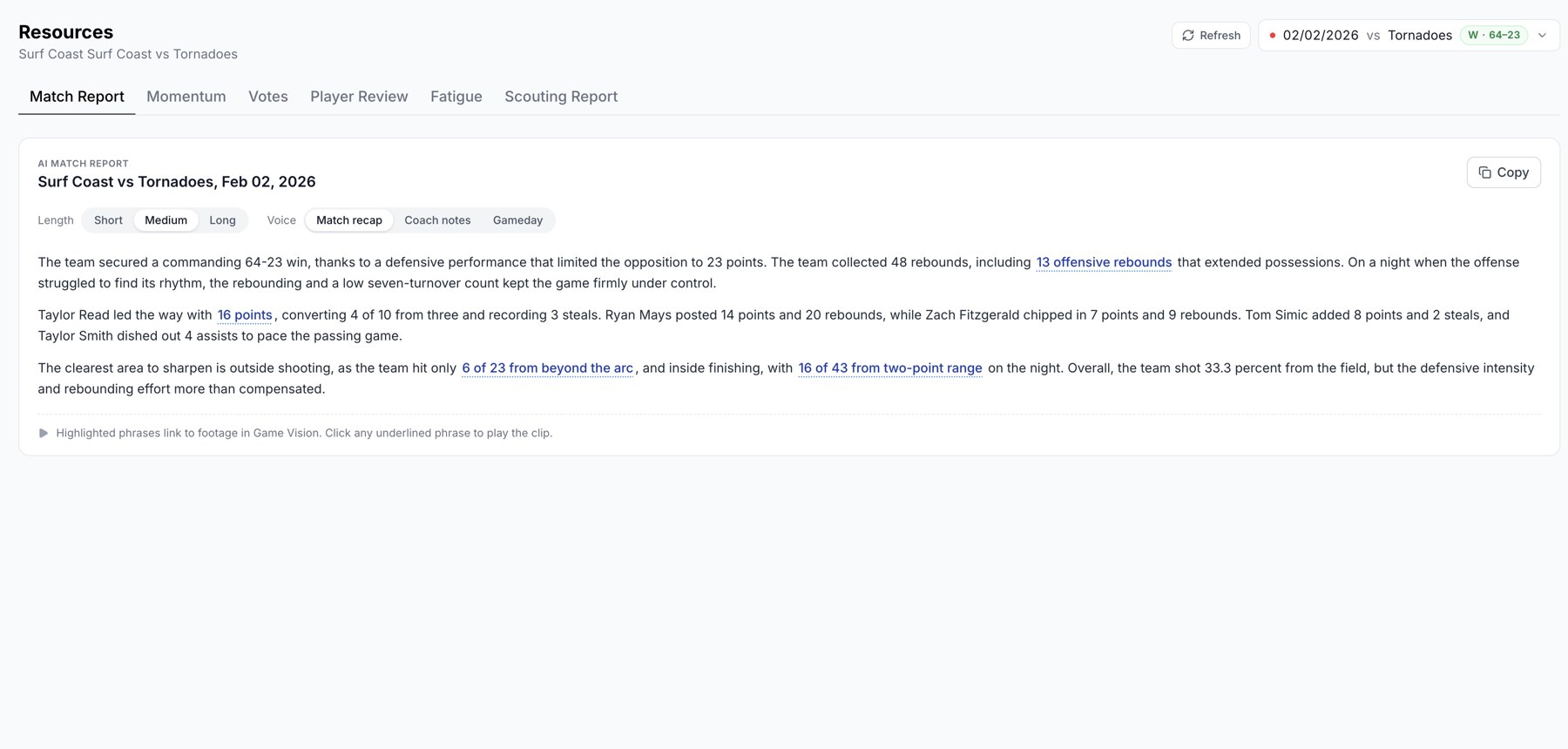
Match Report with length and voice controls.
Review and copy
Read the generated report and open any linked clips to verify important moments. Check the team names, score, and player references before choosing Copy and pasting the text into your intended destination.
Regenerate after changes
If events have changed since the report was generated, the page shows an update notice. Choose Regenerate, wait for it to finish, and review the new report before reusing it. You can also regenerate when the current result needs another attempt.
If a report is unavailable
Check that the game is complete and has recorded event data. Try the displayed retry control after a temporary error. Resources is a club coaching tool and is not shown to player-only accounts.
Related guides
Was this helpful?