
Style and export a branded highlight reel
Set the crop, player photo, logos, graphic, and download format.
Choose the frame
The highlight preview offers 1080 × 1350, Original size, 9:16, and Square. Choose the format for where the reel will be viewed. Review the horizontal crop for each clip so the player and ball remain in view.
Personalise the graphic
Tick at least one clip to unlock the graphic controls. Review the prefilled player name, age group, country, team names, scores, and colours. Add or replace the player photo, club logo, and opponent logo where offered. The image editor can help prepare the cutout.
For a whole-match reel, each clip is branded for the player who made the play. The available graphic fields differ from an individual-player reel.
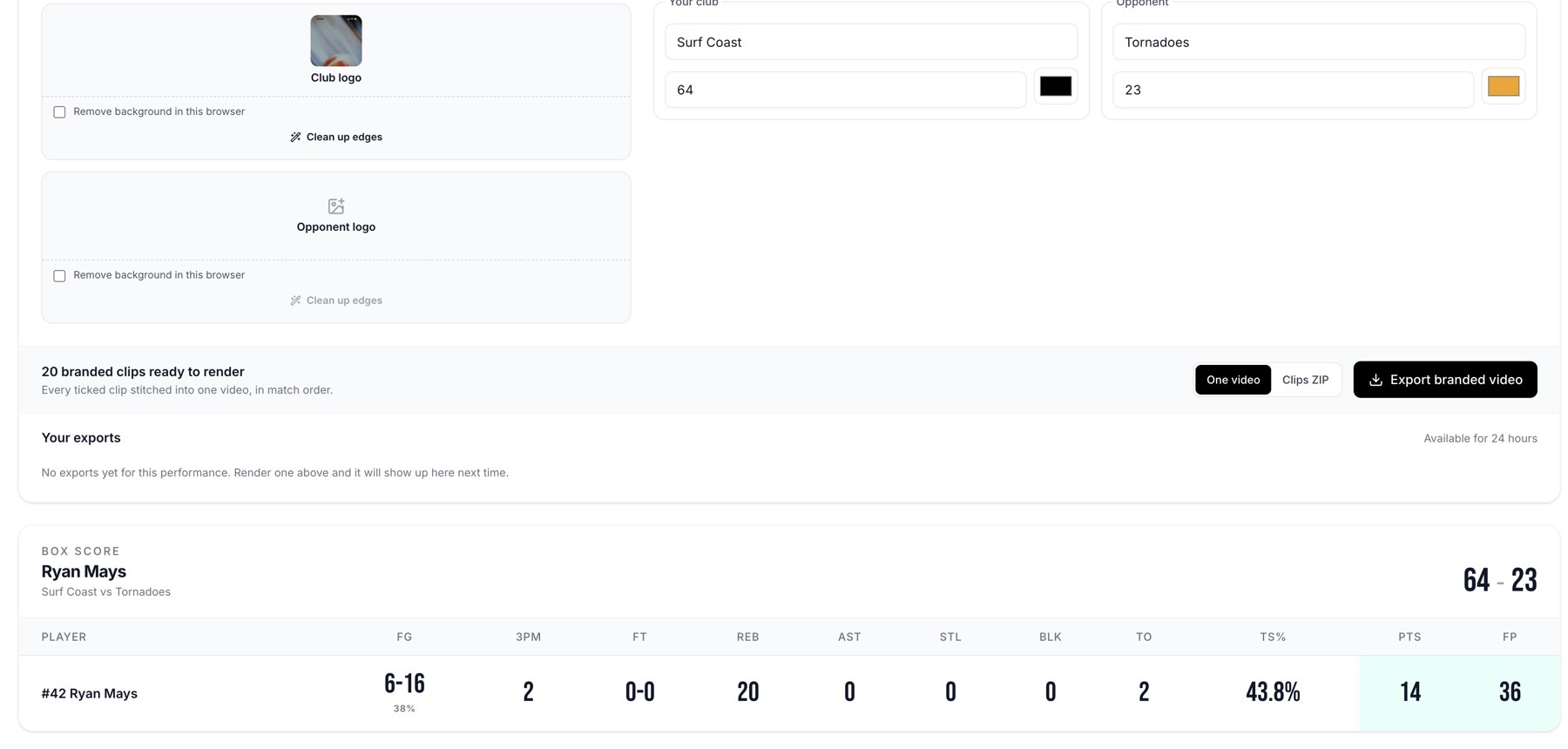
Graphic fields, export format controls, and export history.
Select the deliverable
| Format | What you receive |
|---|---|
| Branded video | One joined reel containing the selected clips. |
| Branded ZIP | The joined reel plus each clip as a separate file. |
Exports shown in Your exports are available for 24 hours, so download the finished files promptly.
Select Export branded video or Export branded ZIP. The job moves through its rendering stages. When ready, use Download, the ready notification, or Your exports history.
If an export fails
Read the job's error, check that at least one valid clip is selected, and try a smaller selection if needed. There is a 100-clip limit per job. Contact support with the game or player, export format, and error text if the failure repeats.
Related guides
Was this helpful?