
↵Open
Superstat changelog
Footage checks, simpler game credits and more mobile review tools

Check your footage before submitting
The web upload flow now includes a footage check with sampled frames, a score out of 10, and practical guidance on team colours, jersey visibility and camera quality.
Review the result, then choose Start upload. If the check flags limitations, you can choose Upload anyways. You can also skip a slow check after 20 seconds once upload eligibility is confirmed.
The footage check is guidance. It does not spend a game credit, and a check that cannot finish does not prevent an otherwise eligible upload.
One game-credit purchase for both teams
New game credits now include analysis of both teams automatically, and so does the welcome game. Choose any quantity from 1 to 200, or use the 10, 20 and 50 game shortcuts in the new credit picker.
Existing single-team credits remain available for team-only analysis. New purchases do not change the coverage of games already uploaded.
A clearer first-game experience
Getting started is simpler: enter your team name, with an optional club name. Your welcome game does not require final scores or a named roster.
After starting the upload, the web app opens your match while the footage continues transferring. A guided tour introduces the platform; previews labelled DEMO DATA show examples while you wait for your own results.
Faster uploads and clearer progress
Browser uploads now transfer more parts in parallel and show speed in Mbps. The match page keeps transfer progress visible, and match cards show thumbnails and clearer processing status.
If processing fails, the web and mobile apps provide more useful explanations and next steps. Keep the browser tab open until the footage transfer finishes.
Add the opposition’s logo
Give each game its own opposition logo from Actions → Edit match details on web, or Edit on mobile. The logo carries through to the match list and branded highlights.
Upload a PNG, JPEG or WebP up to 8 MB. Background removal is available on web and supported iOS devices; the original image can be used when removal is unavailable.
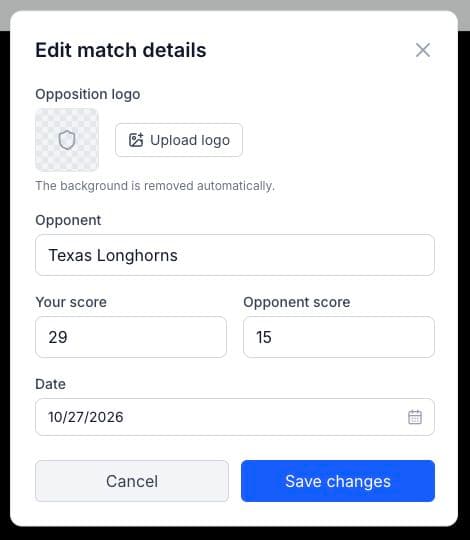
Edit a saved match score
Home-side editors can now edit the saved score after a game has finished processing. On web, select the score in the match header or open Edit match details.
More review tools in the mobile app
Player Timeline: tap a court-time stint to jump to that moment in Watch.
Full-game downloads: save the game footage and follow
Saving n%progress.Merge players: open
Profile → Merge playersand chooseSame nameorAny two players.Player reviews and votes: work with players identified by jersey number, even when a full name is missing.
Smoother navigation: faster match and court-time loading, plus a guided tour when signup opens your new game.
Use the latest app update to access the new mobile tools.